
WordPress has more form plugins than any platform on earth, and they are genuinely good.
Gravity Forms is a serious piece of software. WPForms is friendly and fast to build with. Contact Form 7 has been quietly doing its job since 2007. If you need a form on a WordPress site, you are spoiled.
Then you point a Meta campaign at the page, and you discover the thing none of them do.
The gap every WordPress form plugin shares
They solve the form. They stop at the tracking.
Almost all of them support a browser-side Meta Pixel, either natively or via a companion tracking plugin. None of them send server-side Conversions API events, because doing that requires a server making an authenticated call to Meta, which is a different kind of product from a form builder.
So the standard WordPress stack for paid traffic ends up being:
- A form plugin
- A tracking plugin, or Google Tag Manager
- A server-side GTM container, hosted somewhere, to actually do CAPI
- Something to keep all three talking to each other
Server-side GTM is commonly quoted at four to eight hours for a clean setup, plus hosting and ongoing maintenance. That is a reasonable project for a large site. It is a lot to carry for a plumber's landing page.
What browser-only tracking costs you
Ad blockers strip the Meta Pixel from a meaningful share of page loads before it fires. Safari deletes third-party cookies after 24 hours and caps JavaScript-set first-party cookies at seven days. A homeowner deciding on a $12,000 job routinely takes longer than a week.
So the pixel reports fewer conversions than you got, with less identifying data attached, and Meta optimises delivery against that. Nothing errors. The campaign just quietly gets worse, which is why the usual response is testing more creative rather than checking the measurement.
Meta's own reported figure is 17.8% lower cost per result for advertisers running Conversions API for web events. That is their internal number, so treat it as directional, but the mechanism is straightforward: a server-to-server call cannot be blocked by a browser extension.
The embed, in full
Copy both lines. Paste them wherever you want the form. That is the entire installation.
<script type="module" src="https://cdn.collectform.com/collectform.js"></script>
<collectform-embed form-id="YOUR_FORM_ID"></collectform-embed>
Replace YOUR_FORM_ID with the ID from your form's Share tab, and publish.
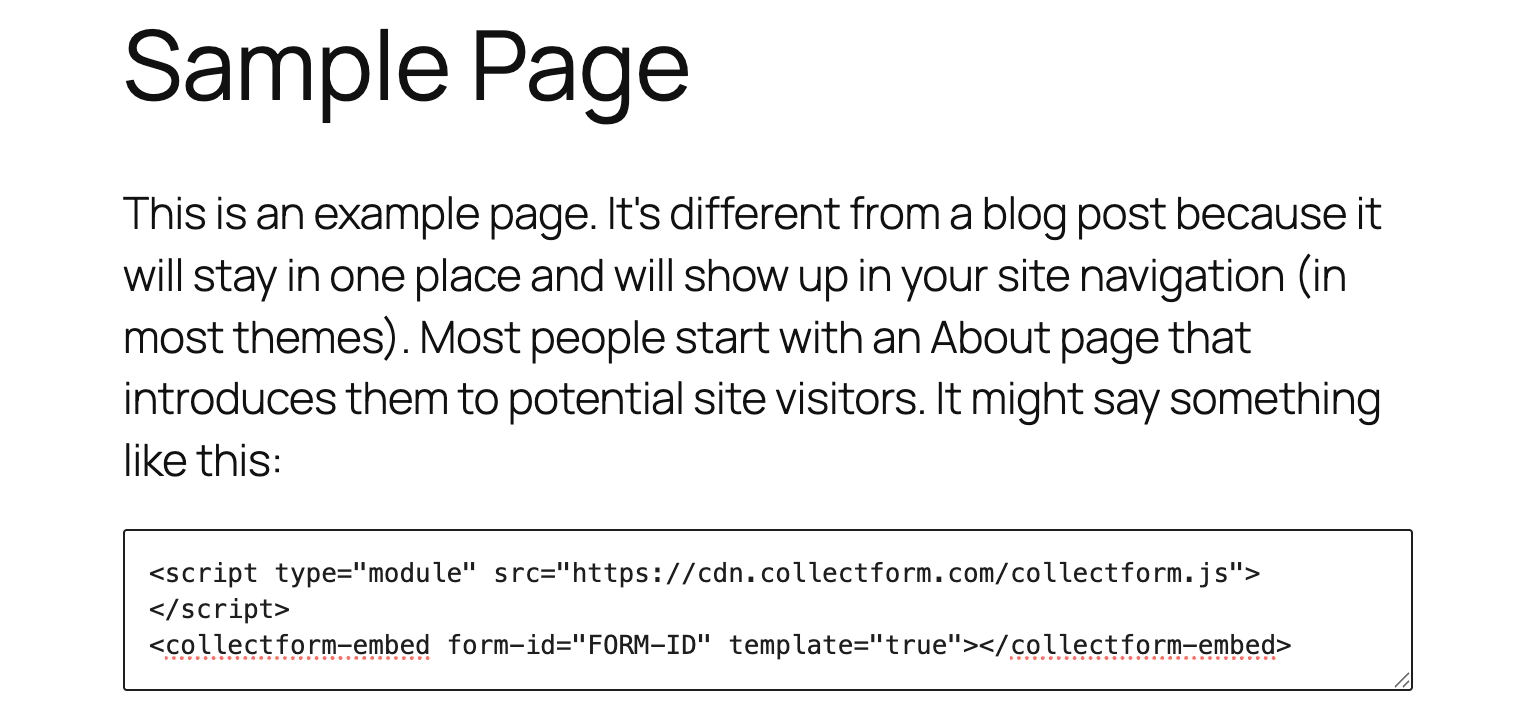
That screenshot is the whole thing: a WordPress page, a Custom HTML block, both lines pasted in. Nothing else was configured first.
No theme files. No plugin. No header editing. Both lines go in the same place, and that place can be almost anything in WordPress:
| Where | How |
|---|---|
| Post or page | Add a Custom HTML block, paste both lines |
| Classic editor | Switch to the Text tab, paste both lines |
| Sidebar or footer | Add a Custom HTML widget |
| Elementor | HTML widget |
| Divi | Code module |
| Beaver Builder | HTML module |
| Full site editing | Custom HTML block anywhere in the template |
The same two lines work in every one of those. There is no separate setup step and nothing to configure first, which is the main practical difference between this and installing a form plugin.
Optional: move the script site-wide if you use several forms
If you are putting forms on many pages, you can lift the first line into your site header so the browser fetches it once and caches it across the whole site, then paste only the element on each page.
That is an optimisation, not a requirement, and it is worth doing when you have forms on five pages rather than one. If you go that route, use a child theme or a snippet plugin rather than editing a parent theme, since a parent theme edit disappears on the next update.
For a single landing page, just paste both lines together and move on.
One attribute worth knowing
If you are embedding one of our prebuilt templates rather than a form from your own account, the element takes an extra attribute:
<collectform-embed form-id="FORM-ID"></collectform-embed>
That tells the widget to load a template rather than look for a form in your workspace. For your own forms you do not need it.
Why this is a web component and not an iframe
Most embeddable forms give you an iframe. It works, and there is a cost most people never price in.
An iframe is a separate document from another origin, and it cannot read the URL of the page containing it. That parent URL is precisely where fbclid, ttclid and gclid land when someone clicks your ad.
<collectform-embed> is a custom element. It runs inside your WordPress page's own document, reads the click ID from the URL on landing, holds it as a hidden field, and attaches it to the conversion event. Same origin, first-party context. We covered why the embedding method changes behaviour separately.
It also means the form inherits your theme's font and sits in the flow of the page rather than in a fixed-height box.
The plugin you are not installing
Worth stating, because WordPress people feel this one.
No plugin means nothing writing to your database, nothing enqueuing CSS and JavaScript on every page whether a form is present or not, nothing to update, and nothing new in your vulnerability surface. Form plugins are among the most common sources of both front-end weight and security advisories on WordPress, precisely because they are so widely installed.
What you get once it is in
Multi-step forms with logic and calculations
One question per screen, which is the format that consistently outperforms a wall of fields on mobile. Formstack's research found multi-page forms converting at 13.9% against 4.5% for single-page.
Conditional logic branches on answers, so a renter is routed out politely instead of answering four more questions about a roof they do not own. Calculation steps work out an estimate from the answers and display it before the contact step, which is the mechanic that makes a form worth completing rather than merely short.
Block types cover single and multiple choice, image choice, swipe cards, dropdowns, scales, ratings, dates, numbers, addresses, plus a loader screen that ticks through steps while the result is calculated.
Native Meta and TikTok Conversions API
Configured in the form. No server container, no tag manager project, no plugin chain.
Events are deduplicated against the browser pixel by shared event ID, so running both counts each conversion once. Double counting is worse than under-counting, because it inflates your dashboard while misleading your bidding.
Advanced matching, field by field
Match quality is scored 0 to 10 on how many identifying parameters each event carries. Hashed email and phone alone typically lands around 5.0 to 6.0. Crossing 8.0 generally needs seven or eight parameters on most events.
You map each field to its parameter and values are hashed before sending. A form collecting an address supplies city, state and zip without asking anything extra. This is the difference between having CAPI switched on and having it work.
Granular button mapping
Rather than one blanket event on submit, a specific button fires a specific event: Lead on the qualified step, Schedule on a booking ending. Each meaningful action becomes its own conversion, so you can optimise toward booked jobs rather than form fills. More on the mechanics.
Cookie consent that keeps the lead
A single toggle shows a consent prompt before any ad tracking runs. If the visitor declines, nothing goes to Meta or TikTok and the submission still reaches you.
That distinction matters. Most consent setups on WordPress are a separate plugin that blocks scripts wholesale, which protects you and costs you the lead. Here you keep the lead and withhold the ad-platform data, with no second plugin to configure.
Zapier, webhooks and email notifications
A webhook fires the moment the form completes, so the lead reaches your CRM in seconds rather than waiting on a sync interval. Most slow speed-to-lead is plumbing rather than people.
Zapier connects to everything else you run. Email notifications go to your team on submission, and a separate respondent email can go to the person who filled it in, carrying their answers or their calculated estimate. If your form shows somebody a number on screen and never emails it to them, you have thrown away a touchpoint.
WordPress-specific notes
You do not need to touch theme files at all. Both lines go in the block. If you later choose to move the script into your site header as an optimisation, use a child theme or a snippet plugin, never the parent theme, since a parent edit disappears on the next update.
Caching plugins can serve a stale page. After adding the embed, purge your cache before deciding it did not work. WP Rocket, W3 Total Cache and LiteSpeed will all happily serve the previous version.
Watch script optimisers. Plugins that defer, combine or delay JavaScript can interfere with a module script. If the form does not render, exclude cdn.collectform.com from JS optimisation before debugging anything else. This is the single most common cause of an embed not appearing on WordPress.
Keep your existing plugin for internal forms. Support requests, job applications, internal workflows and anything tied to WordPress users are exactly what Gravity Forms is good at. Use the embed for the pages behind your ad spend, not for everything.
Plugin versus embed
| Typical form plugin | Collectform embed | |
|---|---|---|
| Multi-step | Add-on or higher tier | Built in |
| Conditional logic | Usually higher tier | Built in |
| Calculations | Add-on | Built in, with variables |
| Meta Pixel | Via plugin or GTM | Built in |
| Meta CAPI | Not natively | Built in, per form |
| TikTok CAPI | Not natively | Built in, per form |
| Advanced matching | No | Field-level mapping |
| Event per button | No | Yes |
| Cookie consent gating | Separate plugin | Built in, lead still delivered |
| Zapier | Usually higher tier | Built in |
| Email notifications | Yes | Yes, plus respondent email |
| Database impact | Stores submissions in your DB | None |
| Update and security burden | Yours | None |
A few honest caveats
Plugins are better at WordPress-native things. Anything that needs to create users, write post types, gate content or hook into WordPress actions belongs in a plugin. An embedded form is a lead capture and tracking tool, not a WordPress extension.
Your submissions live outside WordPress. That is a feature if you want them in one dashboard across many sites, and a drawback if your workflow expects everything in wp-admin. Worth knowing before you switch, not after.
Script optimisers will bite you at least once. See above. It is almost always the cause.
Verify the tracking rather than assuming it. After publishing, confirm your Lead event arrives in Events Manager and check its match quality score. Events arriving and events matching are two different things, and only the second one lowers your cost per lead.
The short version
Keep WordPress for the site. Keep your plugin for internal forms.
For the pages behind your ad spend, paste both lines into a Custom HTML block, map your fields for advanced matching, and check your match quality in Events Manager.
Copy, paste, publish. No plugin, and the tracking actually works.
Collectform is a multi-step lead form you embed on the page you already own, as a web component rather than a plugin or an iframe. Plans start at $20/month billed annually, with a 7-day trial. Browse the templates.